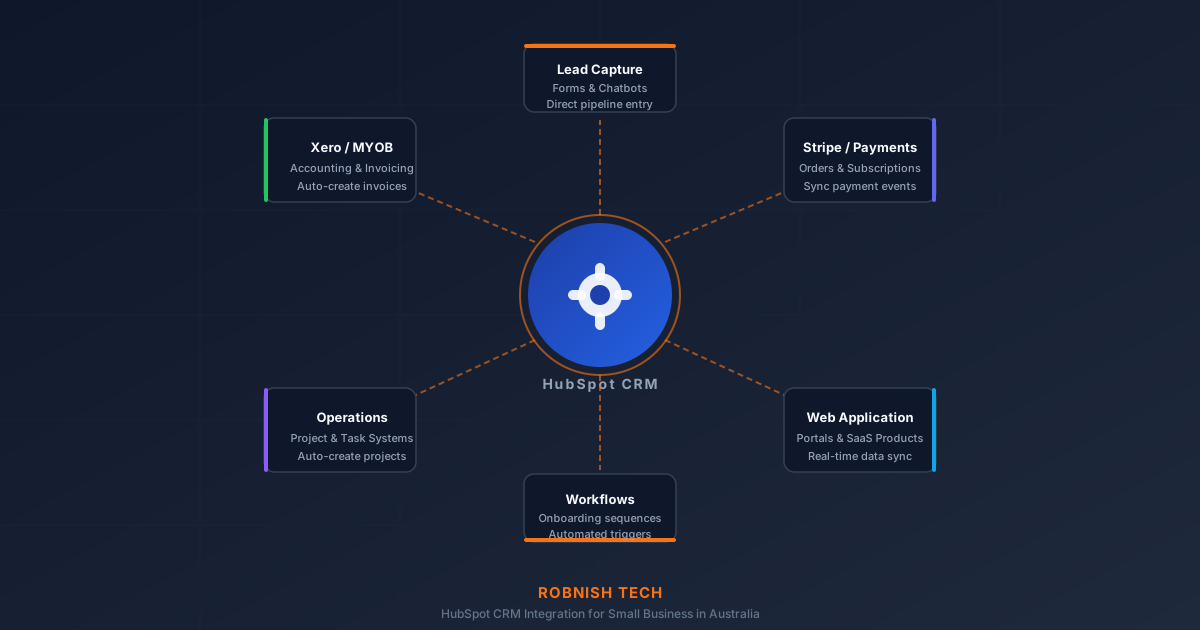
If your team manages leads in HubSpot but your orders live in a spreadsheet, your invoices are in Xero, and your project data is in a completely separate system, you already know the problem: nothing talks to anything.
For Australian small businesses and startups, HubSpot is often the first real CRM investment. It handles contacts, pipelines, email sequences, and marketing automation well. But HubSpot alone is rarely enough — and once your business grows past a handful of staff, manually copying data between HubSpot and your other tools becomes a serious operational liability.
This guide explains what HubSpot CRM integration services actually involve, what setup and custom integration costs in Australia, how long it takes, and how to decide whether to use a native connector, a tool like Zapier, or a custom API integration built for your specific workflow.
What HubSpot Integration Actually Means
HubSpot integration means connecting HubSpot's data — contacts, deals, companies, tickets, emails, activities — to another system so that data can flow between them without manual work.
At its simplest, integration might mean pushing a new contact from a web form straight into HubSpot. At its most sophisticated, it means building a real-time sync where a closed deal in HubSpot automatically creates a project in your operations system, generates a Xero invoice, and triggers an onboarding email sequence without anyone on your team touching it.
The degree of complexity depends on what you need to sync, how often, and in which direction.
Native Connectors vs Custom API Integration
There are three main approaches to connecting HubSpot with other tools.
Native connectors are pre-built integrations in HubSpot's App Marketplace. HubSpot has over 1,500 native integrations with tools like Gmail, Stripe, Slack, Shopify, and Xero. If the tool you use has a native connector, that is usually the fastest and cheapest starting point.
Middleware platforms like Zapier, Make (formerly Integromat), or n8n sit between HubSpot and your other tools and route data using configurable triggers and actions. These work well for straightforward, low-volume data flows — for example, creating a HubSpot contact when someone fills out a Typeform, or logging a closed deal to a Google Sheet. They become expensive and fragile at scale, and they don't handle complex business logic well.
Custom API integration means a developer builds a direct connection between HubSpot's API and your other system's API, with logic tailored to your specific data model and business rules. This is the right choice when native connectors don't exist, when your workflow is complex, when data volumes are high, or when you need reliable, auditable, two-way syncing.
| Approach | Typical cost (AUD) | Best for | Main limitation |
|---|---|---|---|
| Native connector | Included or low add-on fee | Standard tools with an existing HubSpot App Marketplace listing | Fixed functionality; no custom fields or complex logic |
| Middleware (Zapier, Make, n8n) | ~$30–$300+/month | Simple, low-volume flows between common apps | Gets expensive and fragile at scale; weak business logic |
| Custom API integration | ~$1,500–$10,000+ once | Two-way sync, complex logic, audit trails, high volume, SaaS | Higher upfront cost and timeline |
Key Takeaway
Start with a native connector if one exists. Use middleware for simple, low-volume flows. Commission a custom integration when you need reliability, complex logic, or long-term ownership.
Common HubSpot Integration Use Cases for Australian Businesses
The most common integrations we build for Australian SMBs and startups fall into a few categories.
Accounting integration. Connecting HubSpot deals to Xero or MYOB so that a won deal automatically creates a draft invoice with the right line items, client details, and payment terms. This eliminates double data entry between sales and accounts — one of the biggest time sinks in service businesses. For more on the accounting side of API integration, see our Xero API integration guide.
Operations and project management. When a deal closes in HubSpot, triggering a new project record in your internal operations system — with the right client, scope, and assigned team — without a handoff email. Businesses using custom internal tools often need this kind of integration to keep HubSpot as their CRM of record without duplicating data entry.
E-commerce and payments. Syncing order data, subscription status, and payment events from Stripe or WooCommerce into HubSpot contacts and deals so your sales team has full visibility over a customer's purchase history without switching platforms.
Custom web application integration. If your business runs a web portal, client dashboard, or SaaS product, connecting it to HubSpot means new signups flow directly into your pipeline, usage data informs your sales conversations, and churned accounts trigger re-engagement workflows automatically. This is a common requirement for businesses building web applications that need a CRM layer.
Lead capture and enrichment. Pulling data from web forms, chatbots, or third-party lead sources directly into HubSpot with correct contact ownership, source tracking, and lifecycle stage assignment — without manual imports.
How to Choose a HubSpot Integration Partner in Australia
When people search for HubSpot CRM setup companies or a HubSpot integration partner in Australia, they are usually trying to solve one of two problems. The first is setup: pipelines, lifecycle stages, properties, forms, email templates, and reporting inside HubSpot itself. The second is integration: connecting HubSpot to Xero, Stripe, a SaaS product, a client portal, or an internal operations system so the CRM reflects what is really happening in the business.
A good HubSpot integration partner should be able to do both discovery and implementation. Before writing code, they should map your contact, company, deal, ticket, and product data; identify which system owns each field; define what happens when a sync fails; and document how permissions, API limits, and audit logs will be handled. This matters for Australian small businesses because HubSpot often becomes the source of truth for sales while Xero, Shopify, Stripe, or custom software remain the source of truth for operations and finance.
Use this checklist when comparing HubSpot integration partners or setup companies in Australia:
- They scope before they quote. A partner who maps your data model and failure cases first will build something that survives production, not just a demo.
- They understand the HubSpot API properly. Private Apps, OAuth, webhooks, rate limits, and custom objects should be familiar territory, not a learning exercise on your budget.
- They know the Australian systems you run. Real experience with Xero, MYOB, Stripe, Shopify, or custom SaaS matters more than a generic integrations pitch.
- They build for maintainability. You should get documentation, monitoring for failed syncs, and clear ownership so you are not locked to one person.
- They are local and accountable. A Sydney or Australia-based partner working in your timezone makes scoping, testing, and support far easier than an offshore handoff.
If a provider only asks for API keys and starts building immediately, slow down. Reliable HubSpot integrations need a scoped plan, especially when customer data, invoices, or regulated financial-services workflows are involved. Our software discovery phase guide explains how to turn those requirements into a buildable plan before development starts, and our guide to hiring a custom software developer in Australia covers how to vet a technical partner before you commit.
HubSpot + Xero, SaaS, and Financial Services Integrations
The strongest HubSpot integration use cases we see in Australia are not simple contact syncs. They are workflow integrations where HubSpot needs to reflect revenue, onboarding, support, or compliance status from another system.
HubSpot and Xero integration. A common pattern is deal-to-invoice sync: when a deal is marked won in HubSpot, the integration creates or updates a Xero contact, builds a draft invoice, and records the invoice status back on the deal. This is closely related to the accounting-side considerations covered in our Xero vs MYOB integration comparison.
HubSpot for SaaS companies. SaaS teams often need product events, subscription status, trial usage, payment failures, or cancellation signals to appear in HubSpot. That usually requires a custom integration between HubSpot, Stripe, and the product database rather than a basic marketplace connector. See our SaaS development guide for the product-side architecture behind these workflows.
HubSpot for financial services workflows. Financial-services teams need more care around permissions, audit trails, duplicate matching, and data minimisation. The integration should avoid pushing sensitive data into HubSpot unless it is genuinely needed, and it should log failures so client records are not silently missed.
How the HubSpot API Works
HubSpot's REST API is well-documented and relatively developer-friendly. Authentication uses either Private Apps (for server-to-server integrations where you control both sides) or OAuth 2.0 (for integrations that need to act on behalf of a HubSpot user, such as a connector your customers install in their own HubSpot portals).
The API covers all major HubSpot objects: contacts, companies, deals, tickets, products, line items, engagements (calls, emails, meetings, notes), and custom objects. It supports create, read, update, delete, and batch operations, and provides webhooks for real-time event-driven triggers — for example, firing an event the moment a deal stage changes.
Rate limits apply. HubSpot's standard API allows 100 requests per 10 seconds per account, with higher limits available on Enterprise. A well-built integration handles retries and backoff gracefully so rate limits don't cause data loss.
Custom objects, introduced in HubSpot Enterprise, let you model non-standard business data — such as properties, bookings, or equipment — directly inside HubSpot rather than forcing everything into contacts or deals. If your workflow requires this, it's worth confirming which HubSpot tier supports it before scoping the integration.
If you want to understand the broader process of scoping and building API integrations, our development process page covers how we approach discovery, estimation, and delivery.
What Custom HubSpot Integration Costs in Australia
Costs depend heavily on what you're integrating, how complex the logic is, and whether the integration is one-directional or two-way.
For a straightforward one-way integration — for example, pushing form submissions from a website into HubSpot with field mapping — development typically costs between AUD $1,500 and $4,000 and takes a few days.
A two-way sync between HubSpot and Xero, with deal-to-invoice creation, contact sync, and basic error handling, typically costs between AUD $4,000 and $10,000 depending on scope. Integrations involving custom HubSpot objects, SaaS product data, financial-services workflows, complex business logic, or multiple connected systems sit at the higher end of that range or above.
Ongoing costs include hosting for the integration layer (often a small cloud function or server), monitoring, and occasional updates when either platform changes its API. For most SMBs, this is modest — typically AUD $50–$200 per month for hosting and low-volume processing.
These are estimates. RobNish Tech provides a scoped quote after a discovery call, which gives you a fixed price and timeline before any work begins. See our API integration and automation service for more detail.
How Long Does Integration Take?
A basic integration between HubSpot and one other system typically takes two to four weeks from scoping to deployment, including development, testing, and handover.
More complex integrations — multiple systems, two-way sync, custom HubSpot objects, or high-volume event processing — typically run four to eight weeks.
The majority of that time is not writing code. It's mapping the data model correctly, handling edge cases (duplicate contacts, failed payments, missing fields), testing against realistic data, and making sure the integration degrades gracefully when one system is unavailable.
Rushing this phase produces integrations that work in demos but break in production. A well-scoped integration, built and tested properly, requires minimal ongoing maintenance — which is worth the upfront investment for any business running critical operations through connected systems.
When Does Custom Integration Make Sense?
Native connectors and Zapier work well for simple, low-stakes data flows. Consider a custom API integration when:
- You need reliable two-way sync between HubSpot and a system that has no native connector.
- Your workflow has conditional logic — for example, different deal types should create different records in your operations system.
- You need an audit trail or error handling that middleware platforms don't provide.
- Data volumes are high enough that per-task middleware pricing becomes expensive.
- You're building a SaaS product and need HubSpot as a CRM layer for your own customers.
- You want the integration to be maintainable and owned by your business, not dependent on a third-party automation platform that could change pricing or shut down.
If none of those apply and your use case is genuinely simple, start with a native connector or Zapier. A custom integration is an investment — it should be justified by the operational improvement it delivers. If you're unsure which approach fits your situation, get in touch and we can help you decide before committing to any build.
Frequently Asked Questions
Can I connect HubSpot to Xero without a developer?
HubSpot has a native Xero connector through its App Marketplace. For basic contact and invoice sync, this can work without custom development. However, the native connector has limitations — it does not support all Xero invoice types, custom fields, or complex line item mapping. If the native connector covers your workflow, use it. If you hit its limits, a custom integration gives you full control.
How do I choose the best HubSpot integration partner in Australia?
Choose a HubSpot integration partner that scopes the work before quoting, understands the HubSpot API (Private Apps, OAuth, webhooks, rate limits, and custom objects), and has real experience with the Australian systems you run such as Xero, MYOB, Stripe, or Shopify. The best partners build for maintainability with documentation and failed-sync monitoring, and being Sydney or Australia-based in your timezone makes scoping, testing, and ongoing support much easier than an offshore handoff.
What should I look for in a HubSpot integration service provider in Australia?
Look for a provider that understands HubSpot objects, API limits, private app authentication, webhooks, error handling, and the Australian systems you need to connect, such as Xero, MYOB, Stripe, Shopify, or a custom SaaS platform. They should map your data model before quoting, explain how failed syncs are monitored, and give you documentation so the integration is maintainable after launch.
How much does HubSpot integration cost in Australia?
Simple HubSpot CRM setup or one-way sync work often starts from around AUD $1,500 to $4,000. A two-way HubSpot and Xero integration with deal, contact, invoice, and error-handling logic usually sits around AUD $4,000 to $10,000 or more. SaaS, financial services, or multi-system integrations cost more because they need stronger permissions, audit trails, data mapping, and testing.
What is the difference between HubSpot native integrations and a custom-built integration?
Native integrations are pre-built connectors with fixed functionality. A custom-built integration is coded specifically for your business — it can handle any logic, any data model, and any combination of systems. Custom integrations take longer and cost more upfront, but they are more reliable, more flexible, and do not carry ongoing per-task fees.
Do I need HubSpot Enterprise for API integration?
No. HubSpot's API is available on all paid tiers (Starter, Professional, Enterprise) and some features are available on the free tier. Custom objects require Enterprise. Private App authentication, webhooks, and standard API access are available from Starter upward.
How much does it cost to maintain a HubSpot integration after it is built?
Hosting and infrastructure typically costs AUD $50–$200 per month depending on the architecture. API updates from HubSpot or your connected platform occasionally require code changes — most integrations need minor updates once or twice a year. RobNish Tech offers ongoing support arrangements for businesses that want maintained integrations without managing it internally.
How long does a HubSpot integration take in Australia?
A basic integration between HubSpot and one other system usually takes two to four weeks from scoping to deployment, including development, testing, and handover. More complex projects — multiple systems, two-way sync, custom HubSpot objects, or high-volume event processing — typically run four to eight weeks. Most of that time is spent mapping the data model and handling edge cases, not writing code.
Can you integrate HubSpot with a custom-built web application?
Yes. If your web application has a database or API layer, a HubSpot integration can push and pull data in real time. This is common for SaaS products, client portals, and booking systems where you want HubSpot to reflect the state of your application without manual data entry.
Need Help With Your Next Project?
We build custom software, integrate AI, and automate workflows for businesses across Australia.
Get in Touch